> ## Documentation Index
> Fetch the complete documentation index at: https://docs.heffl.com/llms.txt
> Use this file to discover all available pages before exploring further.
# Using the Heffl API
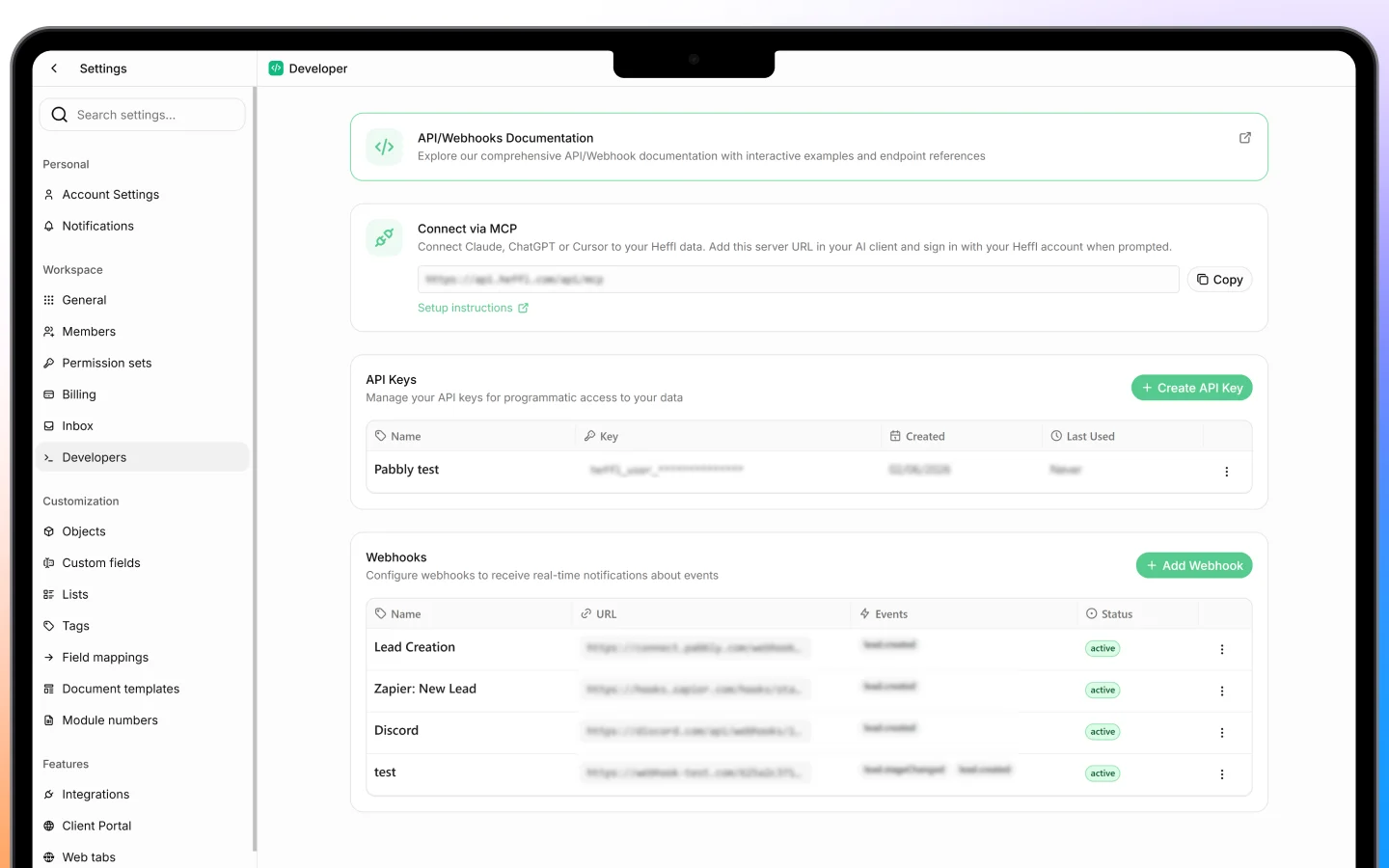
Heffl offers a REST API for developers who want to connect Heffl to their own systems or build custom integrations. This page is a brief orientation; the full technical reference lives in Heffl's developer documentation.
 ***
## What the API is for
The API gives programmatic access to your workspace data, so developers can read and write records from their own code. It covers core records including:
* Contacts and companies
* Deals
* Quotations
* Tasks
* Document templates
With it, you can do things like pull deals into another system, create quotations automatically, or sync contacts between Heffl and an external app.
***
## Who this is for
This is a technical feature aimed at developers. Most users do not need it. For everyday connections to tools like Gmail, Outlook, Stripe, Telr, or Zoho Books, use the ready-made connectors instead, no code required. See [Integrations and connected apps](https://docs.heffl.com/integrations-and-connected-apps).
Reach for the API only when you need a custom integration that the built-in connectors do not cover.
***
## Getting started
1. Find your **API key** under **Settings > Developers**
2. Include the key in the `x-api-key` header on every request
3. Send requests to the API base URL over HTTPS
A simple request to list contacts looks like this:
`curl "" \\ -H "x-api-key: YOUR_API_KEY"`
Treat your API key like a password. Anyone with it can access your workspace data, so keep it secret and do not share it in public code.
***
## Versions
Heffl has two API versions:
* **API v2** is the current REST API (beta), with resource-based paths like `/contacts`, `/companies`, and `/deals`
* **API v1** (legacy) remains fully supported for existing integrations
New integrations should use v2 where possible.
***
## Full developer reference
For everything else, including authentication, the full list of endpoints, filtering and search, pagination, error codes, custom fields, and code examples, see the official developer documentation:
[**docs.heffl.com/api-v2**](https://docs.heffl.com/api-v2/introduction)
It is kept up to date as the API evolves, so it is the authoritative source for building against Heffl.
***
## What to do next
1. Get your API key from **Settings > Developers**
2. Read the [API v2 reference](https://docs.heffl.com/api-v2/introduction)
3. For non-developer needs, use [the built-in integrations](https://docs.heffl.com/integrations-and-connected-apps) instead
***
## What the API is for
The API gives programmatic access to your workspace data, so developers can read and write records from their own code. It covers core records including:
* Contacts and companies
* Deals
* Quotations
* Tasks
* Document templates
With it, you can do things like pull deals into another system, create quotations automatically, or sync contacts between Heffl and an external app.
***
## Who this is for
This is a technical feature aimed at developers. Most users do not need it. For everyday connections to tools like Gmail, Outlook, Stripe, Telr, or Zoho Books, use the ready-made connectors instead, no code required. See [Integrations and connected apps](https://docs.heffl.com/integrations-and-connected-apps).
Reach for the API only when you need a custom integration that the built-in connectors do not cover.
***
## Getting started
1. Find your **API key** under **Settings > Developers**
2. Include the key in the `x-api-key` header on every request
3. Send requests to the API base URL over HTTPS
A simple request to list contacts looks like this:
`curl "" \\ -H "x-api-key: YOUR_API_KEY"`
Treat your API key like a password. Anyone with it can access your workspace data, so keep it secret and do not share it in public code.
***
## Versions
Heffl has two API versions:
* **API v2** is the current REST API (beta), with resource-based paths like `/contacts`, `/companies`, and `/deals`
* **API v1** (legacy) remains fully supported for existing integrations
New integrations should use v2 where possible.
***
## Full developer reference
For everything else, including authentication, the full list of endpoints, filtering and search, pagination, error codes, custom fields, and code examples, see the official developer documentation:
[**docs.heffl.com/api-v2**](https://docs.heffl.com/api-v2/introduction)
It is kept up to date as the API evolves, so it is the authoritative source for building against Heffl.
***
## What to do next
1. Get your API key from **Settings > Developers**
2. Read the [API v2 reference](https://docs.heffl.com/api-v2/introduction)
3. For non-developer needs, use [the built-in integrations](https://docs.heffl.com/integrations-and-connected-apps) instead